The Fastest Way to Pull a Materials and Hardware List for Any Cabinet Project

If you have ever finished a cabinet design and then spent the next two hours counting door panels, calculating board footage, and cross-referencing your hardware supplier's catalog — you already know the problem. The design is done. The hard creative work is finished. And now you are doing spreadsheet math.
Why the Takeoff Process Is Still So Painful
Most cabinet shops and solo builders still pull their materials lists by hand. You go through the design drawing by drawing, and tally up every component: carcasses, face frames, doors, drawers, shelves, rollouts, and then the hardware that ties it all together — hinges, drawer slides, handles, screws, clips.
Even experienced builders miss things. A bank of drawers with five boxes needs five sets of slides, five fronts, and likely ten pulls. Lose count once and you are either over-ordering or running short mid-project. Over-ordering sounds safe until you look at the invoice. Under-ordering means a job stop while you wait on a delivery.
The Specific Mistakes That Cause Project Delays
The most common takeoff errors are small, compounding, and invisible until it is too late. A double-door cabinet counted as a single door. A drawer bottom listed at the wrong thickness. Soft-close hinges specified for a cabinet that ended up with two doors instead of one.
These are not careless mistakes. They are the natural result of a manual process where the design and the materials list exist as two separate documents that have to be kept in sync by hand. Every time the design changes — and designs always change — the list has to be updated manually.
What an Automated List Actually Changes
When your materials and hardware list comes directly out of the design — not as a separate document, but as an output the software generates automatically — the entire category of sync errors disappears.
The design is the source of truth. Change a door from single to double and the hinge count updates. Swap a drawer bank for a rollout cabinet and the slide count adjusts. Add a cabinet to a run and the carcass count, shelf count, and hardware all recalculate. You are not reconciling two documents. You have one document.
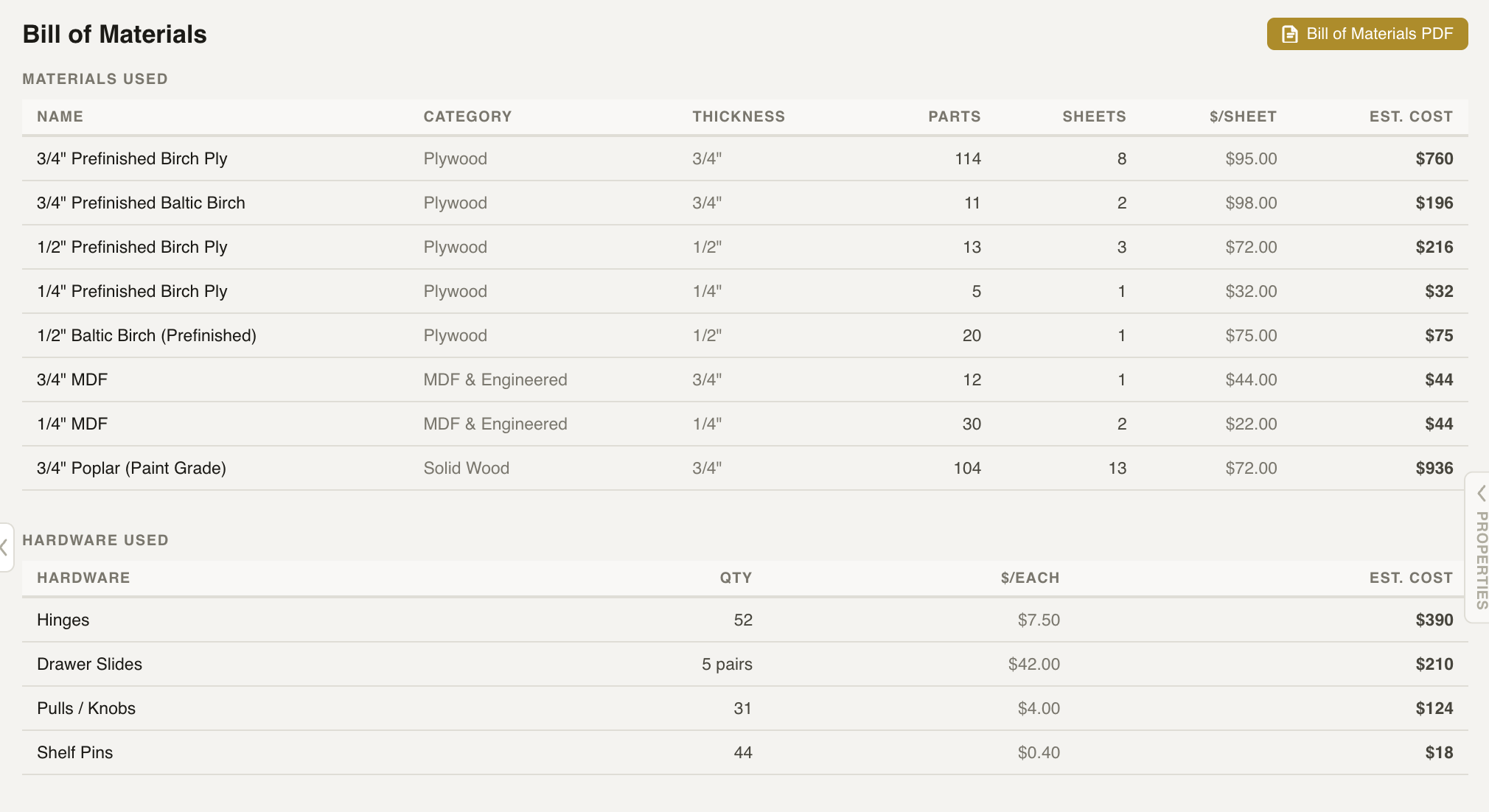
A Cabora bill of materials — every sheet, hinge, slide, and pull counted directly from the design.
A Faster Path from Design to Production
Cabora tracks every component in every cabinet and generates a complete materials and hardware list from that data automatically. The list reflects the current state of the design. If you make changes, the list updates — no manual takeoff required.
For shops running multiple concurrent jobs, this means fewer errors reaching the shop floor and less time on administrative work between design handoff and production. For solo makers, it means you spend your time on work that requires your judgment — not counting hinges.
Visit cabora.ai to try it.
- Manual takeoffs require the design and the parts list to be kept in sync by hand — a constant source of error
- Small mistakes (one door counted as two, wrong thickness) compound into real job delays
- An automated list generated from the design eliminates an entire category of sync errors
- Cabora produces a complete materials and hardware list that updates whenever the design changes