Cabinet Design + AI
The simplest way to
design cabinets.
Sketch, layout, and quote cabinets in your browser — AI does the rest. From hobby builds to small shops, no install, no Windows machine, no training week.
Full design tools for 14 days. Includes 1 project, full costing, 3 AI renders, and watermarked PDF previews. Cut list CSV unlocks on Maker; part stickers and saw-ready cut sheets are on Studio.
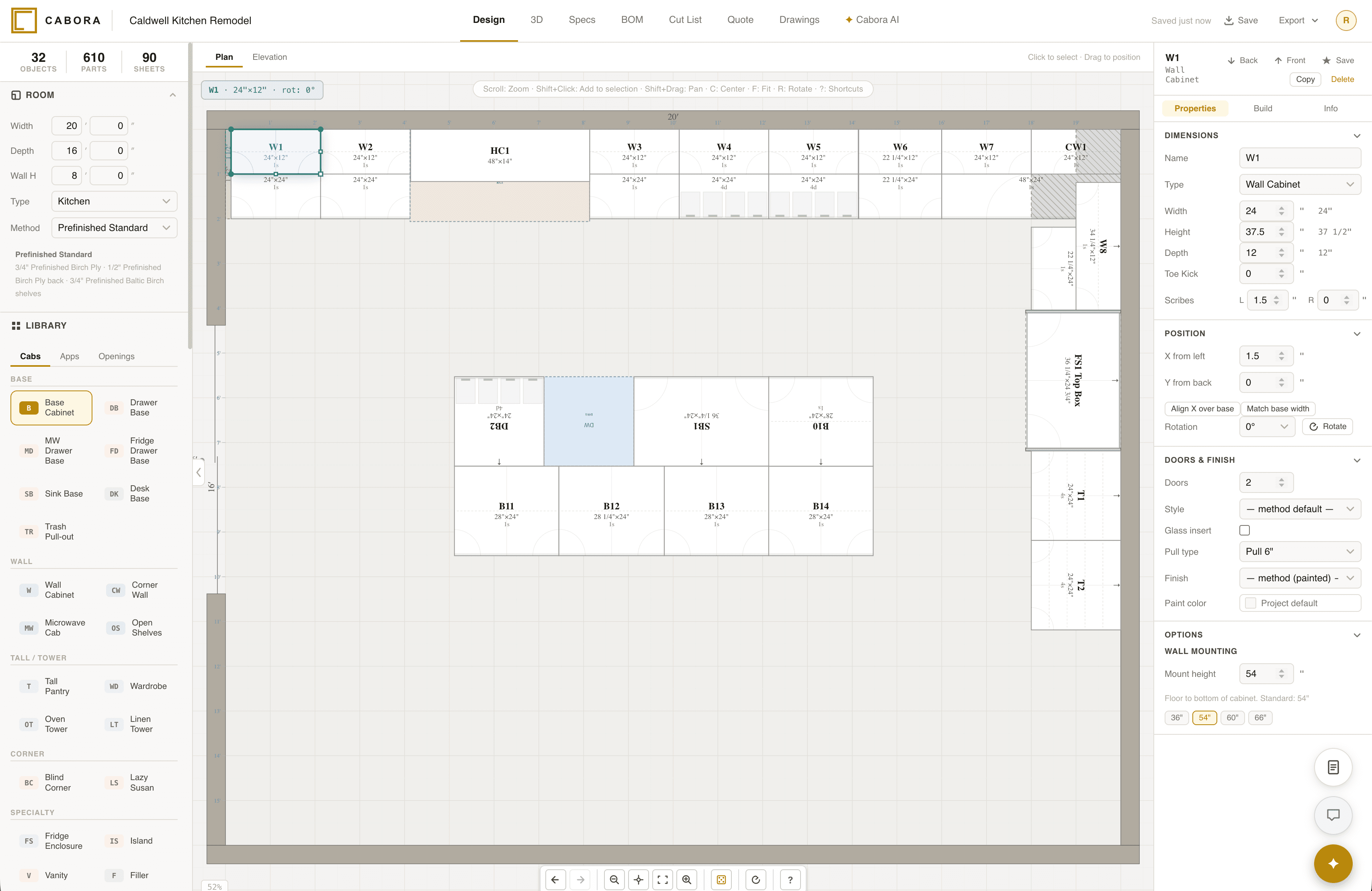
21 cabinet types. All parametric.
Everything you need. Nothing you don’t.
Real cabinet design tools, friendly enough to use the first day. No install. No training week.
Cut list optimization
Grain-locked guillotine nesting. Hardware BOMs. Material breakdowns. Accurate to the kerf.
Job costing engine
Three pricing tiers with labor hours, material costs, overhead multiplier, and retail markup — calculated from your design.
Client-ready PDFs
Proposals with pricing. Dimensioned shop drawings. Buying guides. Cut lists. One click.
291 paint colors
Sherwin-Williams and Benjamin Moore with LRV values. Cabinet-curated. Accurate in 3D.
Cloud save & share
Projects live in the cloud. Share a review link with clients. Access from any device.
AI
Intelligence built in.
Not bolted on.
Knows what a face frame is. Knows what grain direction means for a run of base cabinets. Knows how to optimize sheet yield without wrecking your layout. Ask it anything.
Copilot
Ask questions in plain English. Get answers grounded in your actual project — materials, costs, dimensions.
Design Advisor
Flags dead zones, workflow issues, and wasted corner space with prioritized suggestions.
Build Optimizer
Finds material swaps, size adjustments, and grain fixes that save sheets and money.
AI Renders
Photorealistic cabinet visualizations from your 3D schematic. For client presentations.
Coming soon
Natural Language Design
"12-foot run of shaker bases, 36″ sink centered, blind corner left." Cabora builds it.
Photo-to-Estimate
Client sends a photo of the space. You send back a ballpark. In minutes.
Built for makers, designers, and small shops
Finally a cabinet tool I could actually use on my MacBook. I designed my whole pantry build in an afternoon.
Marcus T. · DIY remodel · Austin, TXWay simpler than SketchUp for cabinets. The AI actually gets what I’m asking for, and I’m out of the design and into the shop the same day.
Ben K. · Solo cabinetmaker · Portland, ORMy clients love the PDF proposals. They look like they came from an interior design firm, and I put them together in a fraction of the time.
Jess R. · Custom cabinet shop · Denver, COPaint like a pro.
Every color cabinet-curated with LRV baked in. Sherwin-Williams and Benjamin Moore, ready for accurate 3D and AI renders.
Plans
Start free. Full design tools, no credit card required.
Maker
For hobbyists & DIYers · 1 seat- Unlimited projects
- All 21 cabinet types
- 3D visualization + plan view
- Cut list export
- 291 paint colors
- AI Advisor — 10/mo
- Knowledge base support
Studio
For solo makers & remodelers · 1 seat- Everything in Maker
- Cut optimization with grain lock
- Client proposal PDFs with pricing
- Full 3-tier job costing engine
- AI Copilot — 50 msgs/mo
- AI Advisor — 25/mo
- AI Renders — 25/mo
- Client share links + CRM
- Project version history + multi-room jobs
- Priority email support
Shop
For growing cabinet shops · starts at 2 seats- Everything in Studio
- 2 seats included, +$20/mo per extra seat
- AI Renders — 100/mo
- AI Copilot — 300/mo
- AI Advisor — 150/mo
- Custom branding on exports
- Client feedback portal
- Project templates
- Custom send address ({your-shop}@cabora.ai)
- Onboarding call
What legacy tools can't do.
Switching?
Moving from Cabinet Vision, KCD, or Mozaik?
We get it. Changing tools is a big deal. That's why we're offering two extra months free on any annual plan (Pro or higher). That's 4 months free in year one. Upload a recent invoice from your current tool to claim it. No import needed — most users recreate their first cabinet layout in under 15 minutes.
Questions
No. Cabora runs entirely in your browser — Chrome, Safari, Edge, or Firefox. Works on Mac, Windows, iPad, and Chromebook. Nothing to download, no license dongles.
Not directly — those tools use proprietary file formats. But you can recreate a typical cabinet layout in Cabora in under 15 minutes, and we offer an extra month free on any annual plan if you're switching from a legacy tool.
Sign up with your email and start designing immediately — no credit card. The trial includes 1 project, 3 AI renders, 10 copilot messages, 5 advisor calls, and watermarked PDF previews of every export type so you can see what Cabora produces. Cut list CSV is on Maker ($15/mo); part stickers and the saw-ready cut sheet PDF are on Studio. At 14 days you subscribe or your account pauses — your projects are saved either way.
Your projects stay in the cloud for 90 days after cancellation. You can export all your data (PDFs, cut lists, project files) at any time before that. We never hold your work hostage.
Cabora requires an internet connection. Your designs are saved to the cloud in real time, so you never lose work — and you can access them from any device.
Cut lists account for kerf width, edge banding, grain direction, and panel oversizing. Material breakdowns include sheet counts, hardware BOMs, and waste percentages. They're shop-ready.
AI Advisor is on every paid plan (Maker 10/mo, Studio 25/mo, Shop 150/mo). AI Copilot, Optimizer, and Brief-to-Layout are on Studio (50 copilot/mo) and Shop (300 copilot/mo). AI Renders are on Studio (25/mo) and Shop (100/mo). See the pricing section for details.
Yes — Studio and Shop plans include shareable review links. Your client gets a clean, branded view of the 3D design and proposal. No login required on their end.
Start drawing.
Plans from $15/mo · Cancel anytime